Questions? We are here to help!
Settings

Setup Notification
The notification setting is used to enable Telegram notification for your Workbeat account.
Path : Settings > Notification
On the Notification page, Workbeat provides 2 notification options:
- Webhook
- Telegram
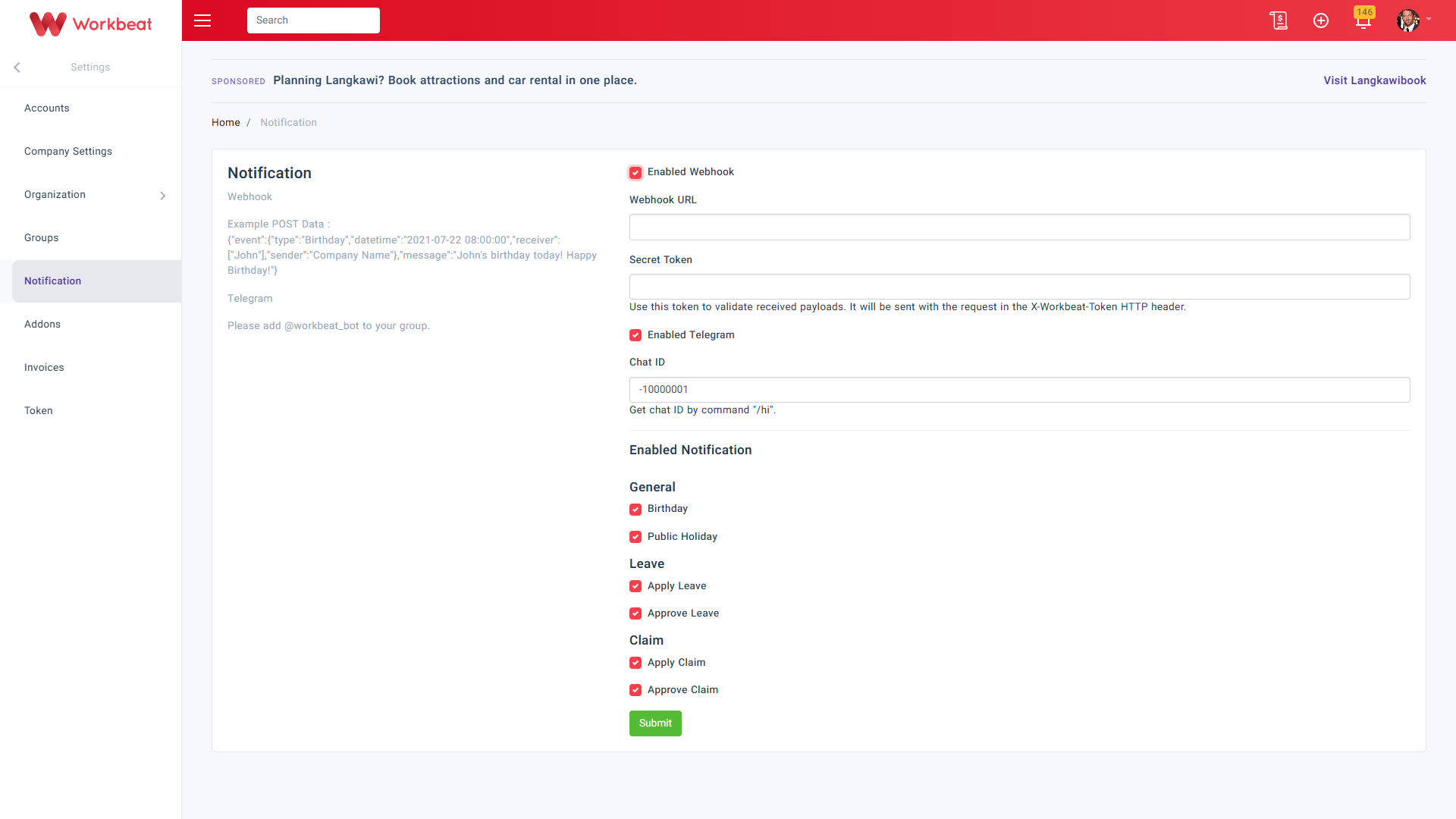
To enable Telegram notification, tick Enabled Telegram.
Then fill in the Chat ID.
The Chat ID can be obtained by sending the /hi command to the Telegram group after adding @workbeat_bot to the group.

If needed, you may also enable Webhook.
Once Enabled Webhook is selected, fill in:
- Webhook URL
- Secret Token
The secret token is used to validate the received payload from Workbeat.
Click Submit to save the notification settings.
Workbeat
14 May 2026 6:33 AM
Categories
- All
- Introduction
- Getting Started
- Employee Guide
- Settings
- People
- Leave
- Payroll
- Claim
- News
- Calendar
- Recruitment
- Attendance
- Document
- Addons
Related Articles
-
Introduction
22 Sep 2025 7:16 AM
-
Employee Guide
22 Sep 2025 7:16 AM
-
Getting Started
22 Sep 2025 7:16 AM
-
Getting Started
22 Sep 2025 7:16 AM
-
Introduction
22 Sep 2025 7:16 AM